
Rosebud retired its free plan on September 30, 2026. If you used it for free, you have two jobs now: get your entries out, and decide where to write next.
We compared six apps on the things a Rosebud user is likely to miss: a free plan, an AI that replies, voice, and memory of past entries. One disclosure: we make Merrin, one of the six. It’s on iPhone and Android. Every claim about the other apps comes from their own help pages, pricing pages, privacy policies, and store listings, checked on November 17, 2026.
What happened to Rosebud’s free plan?
Rosebud’s help center says it’s moving everyone to an upgraded app with a new memory system, and because that system “requires significantly more resources to run,” it can no longer offer a free tier. The same page says “Nothing you’ve written is going away, and you can export everything anytime,” and that former free users have a special offer waiting in the app. The offer’s terms are only shown there.
Rosebud Bloom, the paid plan, is $12.99 a month or $107.99 a year. Long-term memory, which lets Rosebud recall earlier entries, is “automatically enabled for Rosebud Bloom subscribers.” Paid plans also have a weekly AI budget: once it runs out, Dig Deeper conversations stop until the budget resets, though you can still write and get a reflection on the entry. The Thrive plans, sold only in the mobile apps, raise that budget and add more advanced models.
Rosebud runs its AI in the cloud through OpenAI, Anthropic, Google, AWS, and Groq under zero data retention agreements, and encrypts entries in transit and at rest but not end to end. Our journaling apps comparison has the detail.
How to export your Rosebud journal
Do this first, whatever you decide. Rosebud’s export guide gives these steps:
- In the mobile app: open Settings and use the Export option.
- On the web, all entries: go to Settings and click Export under “Export to Markdown.”
- On the web, one entry: click the three-dot icon in the entry’s top right corner and choose Export.
On the web, the full export is Markdown: plain text with light formatting for headings and lists. Rosebud doesn’t say which format the mobile app uses. Keep a copy somewhere you control before you close anything.
If you plan to delete your account, Rosebud’s deletion guide warns that “Deleting your account is irreversible” and recommends exporting first. Cancel any subscription, then go to Settings (Manage account, on mobile) and choose Delete account.
Can you import a Rosebud export into another app?
Not directly, going by what these apps document. None of them lists Rosebud as an import source. Day One’s import guide supports plain text only in its Mac app, with each entry starting on a date line in a set format; on other platforms it takes Day One JSON, CSV, or files from apps such as Journey and Diaro. Reflection imports Day One files and CSV. Life Note’s pricing page says “Import your journal from anywhere” without listing formats, so ask its support before you count on it. Mindsera and Apple Journal don’t document an import, and Merrin can’t import entries.
So for most people, switching means starting fresh and keeping the old journal as an archive. Markdown opens in any text editor, and note apps built on Markdown files, such as Obsidian, read it as it is.
Rosebud alternatives compared
| App | Free plan | Where the AI runs | Voice | Memory of past entries | Runs on | Paid plan |
|---|---|---|---|---|---|---|
| Rosebud (for reference) | None since Sep 30, 2026 | Cloud | Voice journaling | Long-term memory, on Bloom | iPhone, Android, web | Bloom $12.99 a month or $107.99 a year |
| Life Note | 3 entries a week, one mentor reply each | Cloud | 10 recordings a week free | Mentors draw on past entries; “Medium” memory quality free | iPhone, Android, web | $10.99 a month or $99.99 a year |
| Reflection | Unlimited entries; includes the AI Coach | Cloud (Google Gemini) | Voice journaling; Voice Call | Ask Your Journal | iPhone, iPad, Mac, Android, web | Premium $8 a month, or $5.75 a month billed annually |
| Mindsera | A journal with 52+ templates; AI is paid | Cloud | Voice Mode and Call Mode, paid | Ask Your Journal, paid | iPhone, Android, web | Genius $14.99 a month or $129 a year |
| Day One | Unlimited entries on one device; no AI | Daily Chat: Day One’s AI provider | Audio and transcription on Silver | Daily Chat memories, on Gold | iPhone, iPad, Mac, Android, Windows, web | Silver $49.99 a year; Gold, with AI, $74.99 a year |
| Apple Journal | Free | Suggestions on the device; writing prompts through Apple Intelligence | Audio recordings, transcribed in English | None | iPhone, iPad, Mac | Free |
| Merrin | No message limits; memory and voice included | On your phone | Voice conversations, on the phone | Memories you can view, edit, and delete | iPhone and Android | Pro $29.99 a year or $99.99 once |
Life Note, Reflection, and Mindsera are the closest to Rosebud: an AI reads your entry and writes back. All three run that AI in the cloud, like Rosebud. Day One and Apple Journal are traditional journals with no AI on their free plans. Merrin is the one where the AI runs on the phone, and the only one you can’t download yet.
The Rosebud alternatives, one by one
Life Note: the closest free Rosebud alternative
Life Note has AI mentors, modeled on writers and thinkers such as Jung, Satir, and Zhuangzi, who reply to what you write. Mentors refer back to earlier entries, and the subscription promises “mentors who remember your past entries better.” There’s voice journaling, and a weekly letter and portrait if you write three entries in a week.
The free plan has a cap: 3 entries a week (10 in your first week), one mentor reply per entry, and 10 voice recordings a week. Life Note says encryption, the app lock, export, and account deletion “are never gated.” The subscription, $10.99 a month or $99.99 a year, removes the entry cap and allows up to three mentors per entry.
Its privacy policy says entries are encrypted before they’re stored and decrypted on its servers when a mentor replies. It doesn’t name the AI provider, and it says entries are “never used to train AI models.”
Pros
- AI replies and memory on the free plan
- Says export and deletion are free on every plan
Limitations
- Three entries a week on the free plan
- Cloud AI, from a provider it doesn't name
Best for: Rosebud users who want AI replies and memory without paying, and write a few times a week.
Reflection: an AI coach on the free plan
Reflection has an AI Coach that replies inside your entry as you write, Ask Your Journal for questions about “patterns, people, or how you felt last spring,” and a Voice Call mode that talks back out loud and saves the transcript to your journal. There are 100+ guided journals; the full library is part of Premium.
The free plan has unlimited entries on iPhone, Android, and the web, with limited syncing and one photo per entry. Reflection says it “includes our core journaling features, daily prompts, and access to the AI Coach.” Premium, $8 a month or $5.75 a month billed annually, adds “Unlimited AI-Enhanced Search & Insights” and “Unlimited AI Writing Support,” which suggests the free AI has a limit, though the page doesn’t give one. There’s a 7-day trial.
The AI runs on Google Gemini, and Reflection says “Your data and journal entries are never used to train AI models — not even on our free plan.” Its privacy policy doesn’t mention end-to-end encryption. It also imports Day One files and CSV, which helps if you kept a Day One journal before Rosebud.
Pros
- Unlimited entries, with the AI Coach, free
- Voice Call and Ask Your Journal
- Imports Day One and CSV; exports PDF, JSON, or CSV
Limitations
- Free AI limits aren't spelled out
- Cloud AI, and no end-to-end encryption documented
Best for: daily writers who want an AI to reply on the free plan.
Mindsera: thinking templates, with AI on the paid plan
Mindsera builds its journal around 52+ templates based on mental models and frameworks, such as first-principles thinking. On the paid Genius plan, AI “Minds” comment on your writing, Ask Your Journal answers questions across your entries, Voice Mode transcribes what you say, and Call Mode is a spoken back-and-forth.
The free Curious plan is a minimal journal with the templates, a habit tracker, a passcode, tags, and export to Markdown or PDF. Apart from suggested tags, the AI is on Genius, at $14.99 a month or $129 a year. So for a former Rosebud free user, Mindsera’s free plan is a plain journal.
Its privacy policy names OpenAI, Anthropic, and Google, says plainly that “Mindsera does not currently use end-to-end encryption,” and says “Your journal content is not used to train or improve AI models.”
Pros
- 52+ thinking templates on the free plan
- Voice conversations and Ask Your Journal on Genius
Limitations
- Almost no AI on the free plan
- The priciest paid plan of the alternatives here
Best for: people who liked Rosebud’s guided journals and want structured templates, with AI if they pay.
Day One: a free journal without AI
Day One is the most established journal here, with apps for iPhone, iPad, Mac, Android, Windows, and the web. The free Basic plan has unlimited entries and journals, daily prompts, search, and end-to-end encryption, on one device with one photo per entry. Silver, $49.99 a year, adds sync and audio recordings with transcription.
The AI is on Gold, $74.99 a year. Its main feature, Daily Chat, builds memories of your routines and relationships, and “sends your messages, along with any memories it has built up, to our AI provider.” Voice Mode uses OpenAI’s Realtime API. Day One says it doesn’t keep those requests once they’re processed and doesn’t use your content for training. If memory matters to you, note that “Reviewing or deleting individual memories isn’t available in the iPhone, iPad, or Mac apps.”
Pros
- End-to-end encryption on the free plan
- Runs on almost everything, including Windows and the web
Limitations
- No AI below Gold, $74.99 a year
- The free plan works on one device
Best for: people who want a polished journal and can do without the AI, or pay for it later.
Apple Journal: free and private, iPhone only
Apple Journal is free on iPhone, iPad, and Mac. It suggests moments to write about from your photos, places, and workouts, grouped on the device. On iOS 27 with Apple Intelligence, it can suggest up to three writing prompts per entry. You can record audio in an entry and have it transcribed, in English. Entries are end-to-end encrypted in iCloud.
There’s no AI conversation and no memory of past entries, and Apple doesn’t document a way to import entries from another app. On Android, see the closest apps to Apple Journal.
Pros
- Free, end-to-end encrypted, and already on your iPhone
- Suggestions are grouped on the device
Limitations
- Apple devices only
- No AI that replies to what you write
Best for: iPhone users who want a free, private diary and don’t need an AI to write back.
Merrin: memory on the free plan, with the AI on your phone
Merrin is free on the App Store and Google Play. It works differently from the rest. Instead of opening a blank entry, you talk or type about what’s on your mind, Merrin asks follow-up questions, and the conversation is saved as a journal entry. Our page on conversational journaling walks through it.
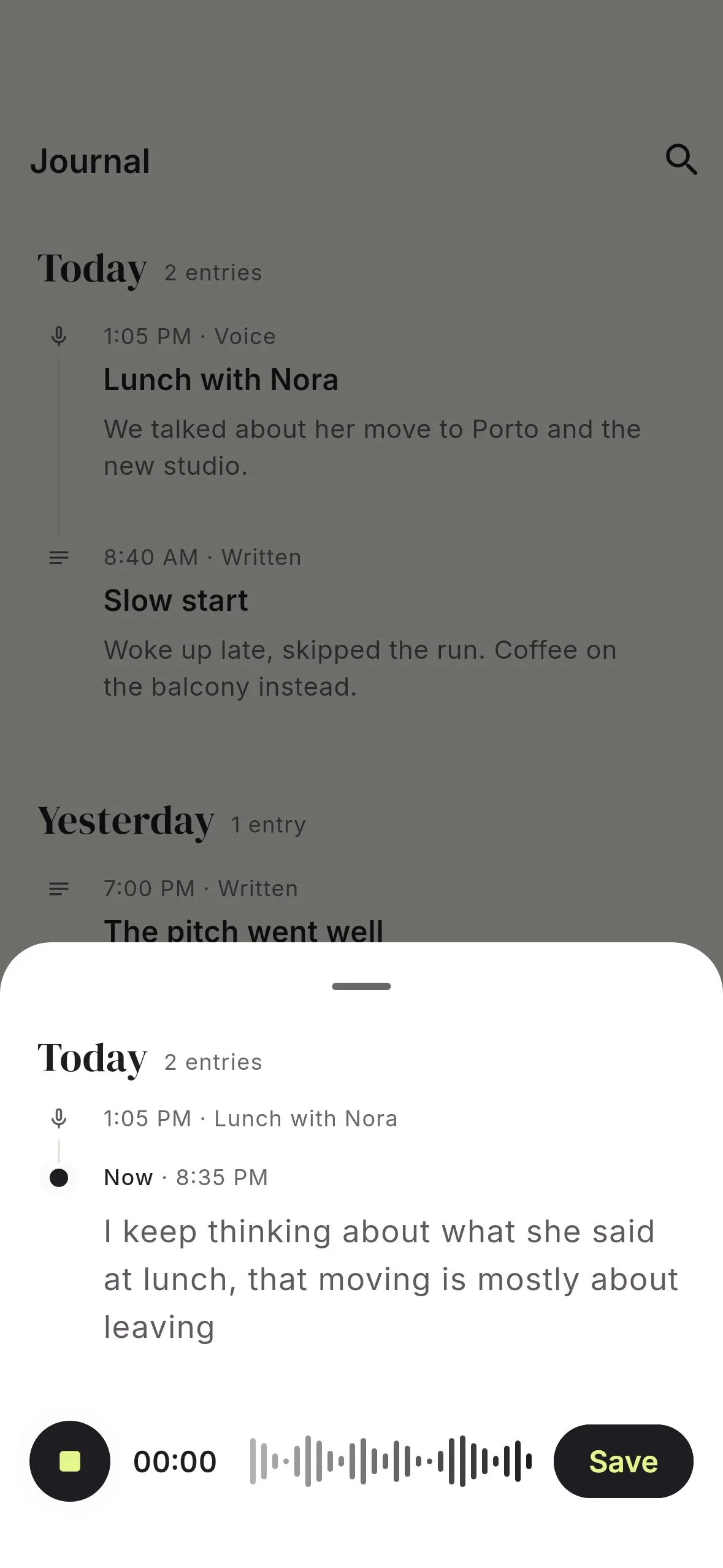
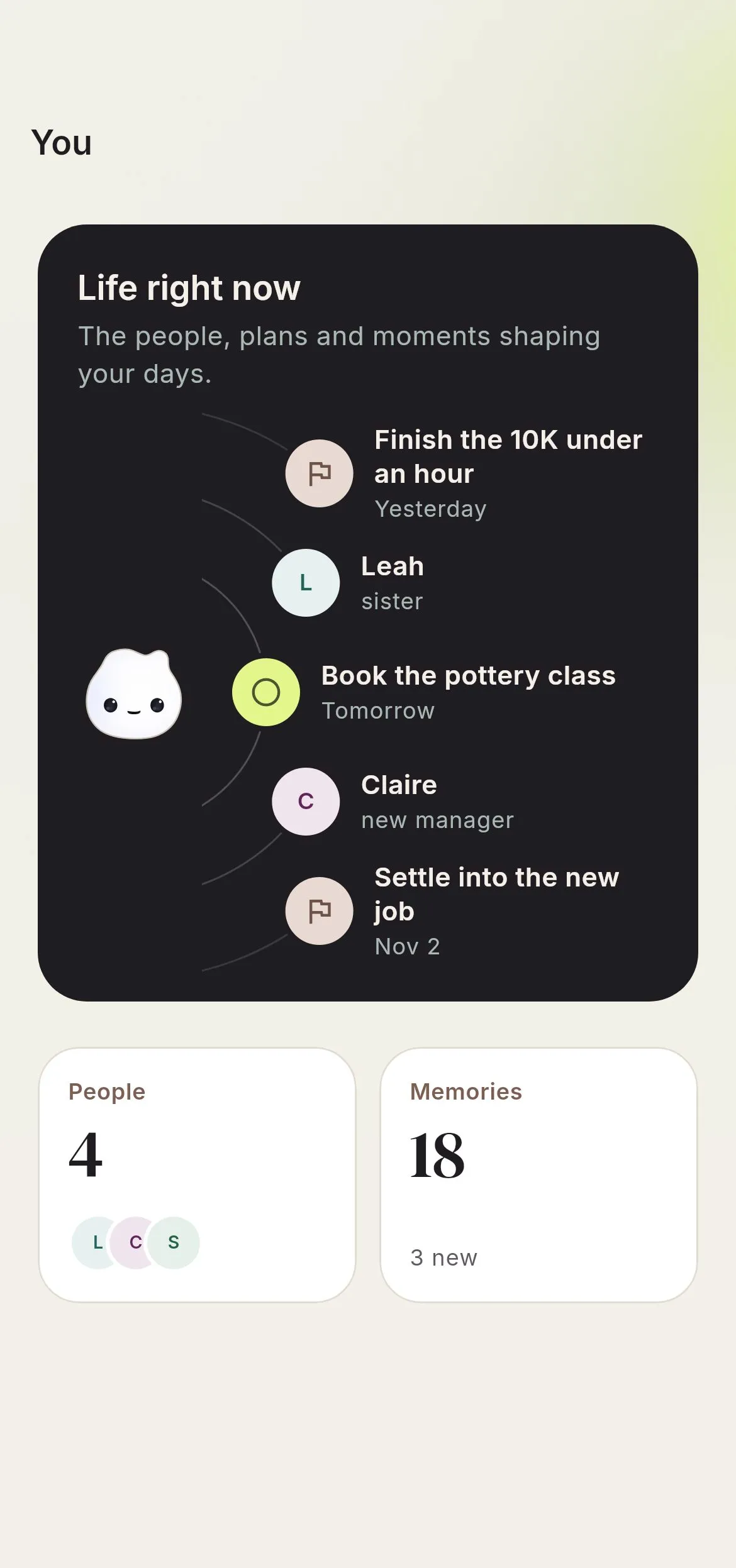
The AI runs on the phone, so your entries aren’t sent to a server for it to read them, and there’s no account. Speech recognition also runs on the phone by default. Memory is on the free plan: Merrin remembers the people, plans, and decisions you mention, and you can see, edit, or delete each memory. We explain why that matters in AI memory you can see and delete. The free plan has no message limits and includes voice, journaling, memory, search by meaning, and the Listener, Coach, and Open Conversation perspectives. Pro, $29.99 a year or $99.99 once, adds insights into what keeps coming back, weekly reflections, three more perspectives, and a larger model.
Merrin can’t import your Rosebud export, and it has no guided journal library. A model small enough for a phone knows less than the cloud models Rosebud lets you pick from. It also needs an iPhone or iPad with an A12 chip or newer on iOS 16, or a 64-bit phone on Android 11 or later, with at least 4 GB of RAM and about 5 GB free; our guide to which phones can run local AI has the list. If you ever leave, Settings → Backup & restore → Export readable copy saves your journal as plain text or Markdown, on the free plan.
Pros
- The AI runs on your phone, with no account
- Memory, voice, and search by meaning on the free plan, with no message limits
- A readable export on every plan
Limitations
- Not in the app stores yet
- No guided journals, and no import from other apps
- Phone-sized models know less than cloud models
Best for: people who’d rather talk than write, and want the AI on their phone instead of a server.
When Rosebud is still the better choice
Rosebud’s guided journals are built with mental health professionals and draw on specific methods: a CBT exercise for reframing negative thoughts, an Acceptance and Commitment journal, a gratitude journal, and, on its homepage, a guided IFS journal. Mindsera’s templates and Reflection’s guides are the nearest, and they aren’t the same set.
You can also choose the model behind each Rosebud persona, from efficient ones such as Haiku and Gemini 3.0 Flash to more capable ones that use more of your weekly budget. Large cloud models know far more than anything that fits on a phone.
And if you have months or years of entries in Rosebud, its memory can draw on them. Since none of these apps imports a Rosebud export, moving means your new journal starts without that history. If that history is the point, check the offer in the Rosebud app before you go.
Which Rosebud alternative should you pick?
- You want AI replies for free and write a few times a week: Life Note.
- You write most days and want an AI coach on the free plan: Reflection.
- You want structured thinking templates, and AI if you pay: Mindsera.
- You don’t need AI: Day One’s free plan, or Apple Journal on an iPhone.
- You want the AI on your phone instead of a server: Merrin, on iPhone and Android. Get the app.
- You rely on the guided journals or years of memory: Rosebud Bloom, after checking the offer in the app.
For how cloud AI services handle personal writing more generally, our policy review of ChatGPT, Gemini, Claude, Copilot, and Grok covers training, retention, and ads.
Frequently asked questions
Does Rosebud still have a free plan?
No. Rosebud retired its free plan on September 30, 2026, saying its new memory system costs too much to run to keep a free tier. The paid plan, Rosebud Bloom, is $12.99 a month or $107.99 a year. Rosebud's help center says former free users have an offer waiting in the app.
How do I export my Rosebud journal?
In the mobile app, open Settings and use Export. On the web, go to Settings and click Export under "Export to Markdown" to download every entry; for a single entry, click the three-dot icon in its top right corner and choose Export. Rosebud says you can export everything anytime.
What is the best free alternative to Rosebud?
For AI that replies to your entries, Life Note and Reflection both have free plans. Life Note's allows 3 entries a week with one mentor reply each; Reflection's includes its AI Coach, with unlimited AI search and insights on Premium. If you don't need AI, Day One's Basic plan and Apple Journal are free.
Can I import my Rosebud entries into another journal app?
None of the apps in this comparison lists Rosebud as an import source. Day One's Mac app imports plain text if each entry starts with a date line, Reflection imports Day One files and CSV, and Life Note says you can import your journal "from anywhere" without listing formats. Rosebud's web export is Markdown, which opens in any text editor and in Markdown note apps such as Obsidian.
Is there a free AI journal with memory?
Life Note's free plan includes mentors that draw on past entries, at a lower memory quality than its paid plan. Reflection has Ask Your Journal, which answers questions from past entries, though its pricing page doesn't say how much of it the free plan includes. Merrin's free plan includes memory you can view, edit, and delete; it's on iPhone and Android. Rosebud's long-term memory is part of Bloom, and Day One's Daily Chat memories need Gold.
Which Rosebud alternative keeps my entries on my phone?
Merrin runs its AI on your phone and has no account. It's on the App Store and Google Play. Of the others, Day One and Apple Journal end-to-end encrypt what they sync, but neither offers an AI that replies to you for free. Life Note, Reflection, and Mindsera run their AI in the cloud.