
A private AI chat app can mean a few different things. It might run the model on your phone, so nothing you type has to leave it. It might send your message to a server run by a company that promises not to log it. Or it might keep your chats encrypted on your device and still pass each prompt to a big AI provider. All three get called private, and they protect different things.
There’s a second question that gets less attention: what happens to a conversation once it’s over. Most of these apps keep a chat history you can scroll back through. A few go further and remember details from one conversation to use in the next. That’s useful, and it’s also the part you’ll want to be able to see and control.
This list is published by the team that builds Merrin, and Merrin is first on it. It’s labeled for what it’s good at, personal conversations and memory, and not as the best overall pick, because these seven apps do different jobs.
We re-checked the other six apps against their own websites, documentation, and store listings.
- Proton Lumo now takes dictation on the web as well as in its mobile apps.
- Private Mind: version 1.3.5 added Liquid AI’s LFM 3 models, including one that answers questions about photos. We now also say that its Google Play listing declares it may share app activity with third parties, and that its web search sends your query out when you switch it on.
- Duck.ai: its optional sync stores chats encrypted on DuckDuckGo’s servers, and its paid plans are called Plus and Pro.
- AnythingLLM: we added that it sends anonymous usage data until you switch it off.
- Private AI: we narrowed the privacy claim to what its Play listing shows, which is that no data is collected.
- Merrin: the list of Pro features now includes insights into what keeps coming back.
No changes for Jan.
The 7 apps at a glance
| # | App | Best for | Where the AI runs | Platforms | Price |
|---|---|---|---|---|---|
| 1 | Merrin | Personal conversations and memory | Your phone | iOS, Android | Free; Pro $29.99/year or $99.99 once |
| 2 | Private Mind | Questions about your documents | Your phone | iOS, iPadOS, Android | Free |
| 3 | Private AI | Local models on Android | Your phone | Android | Free; paid upgrade |
| 4 | Jan | Desktop AI with model choice | Your computer, cloud optional | macOS, Windows, Linux | Free |
| 5 | AnythingLLM | Document workspaces | Your computer or phone, cloud optional | macOS, Windows, Linux, Android | Free; optional Pro |
| 6 | Proton Lumo | Private cloud AI | Proton’s servers | Web, iOS, Android | Free; Plus $9.99/month billed yearly |
| 7 | Duck.ai | Anonymous cloud chat | Third-party AI providers | Web, DuckDuckGo browser | Free; paid plans |
How we compared them
We looked at five things for each app: where the AI runs, whether it works offline, whether it supports voice, whether it remembers anything between chats, and what it costs. Every detail about another company’s app comes from its own website, documentation, or store listing, last checked on October 30, 2026. We didn’t run speed or quality benchmarks, and we haven’t tested the other apps in airplane mode, so we only say an app works offline when its maker says so.
Where the table says “Not documented,” we couldn’t find the feature in the app’s own materials. That doesn’t prove the app lacks it.
1. Merrin: best for personal memory and journaling
Most offline AI apps are built to answer questions privately. Merrin is built for a different kind of conversation: the kind about your own life. You talk or type about what’s on your mind, and it asks follow-up questions. You can have it just listen, coach you toward a decision, or argue the other side. Over time it keeps a journal of those conversations and remembers what matters, so you can come back to them later. Our page on conversational journaling shows how that works.
It’s meant for people who want a private place to think out loud.
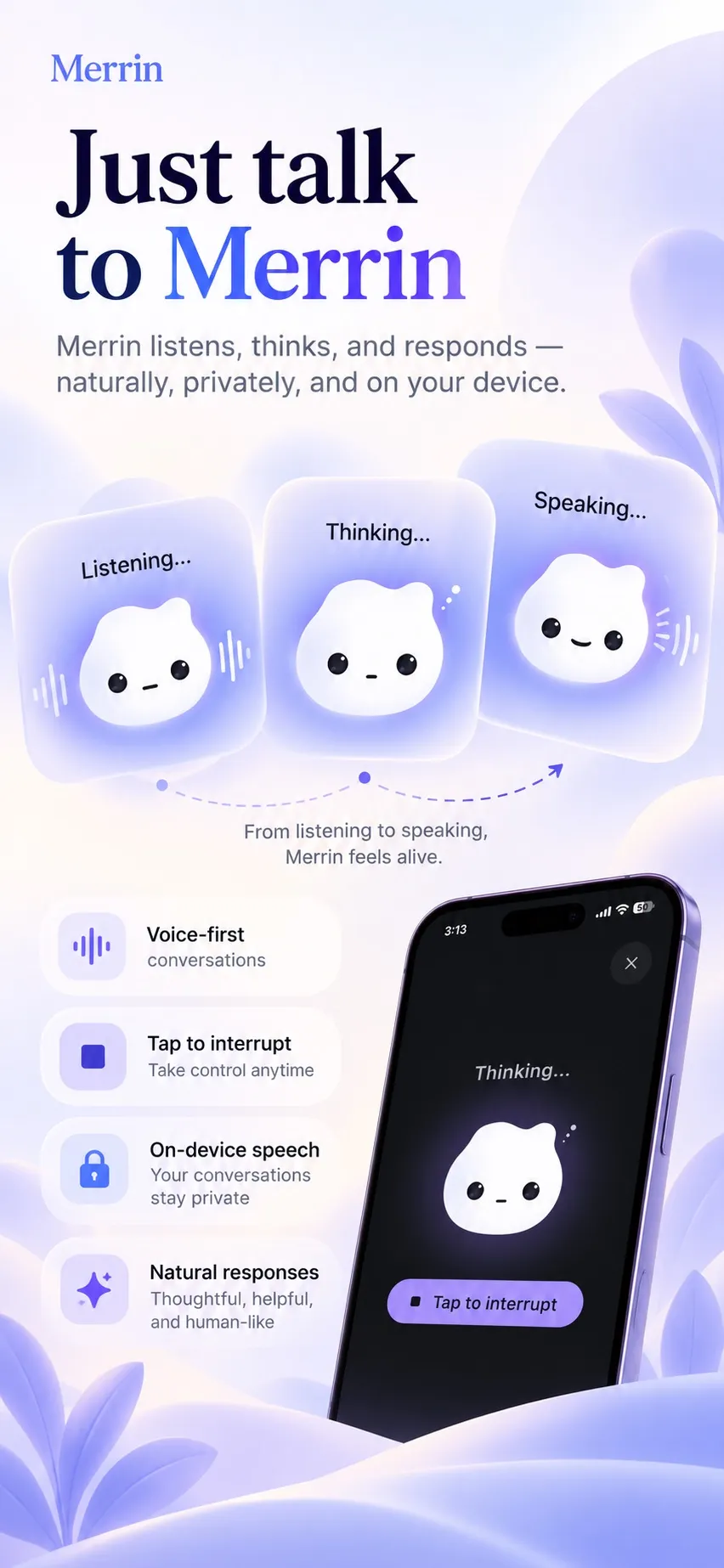
- The AI runs on your phone. Conversations, voice transcripts, journal entries, and memories are designed to stay on the device during normal use. There’s no account to create. Core features work without internet once the AI models are installed.
- You can talk instead of type. Voice conversations are on the free plan, and speech recognition is designed to run on the phone too.
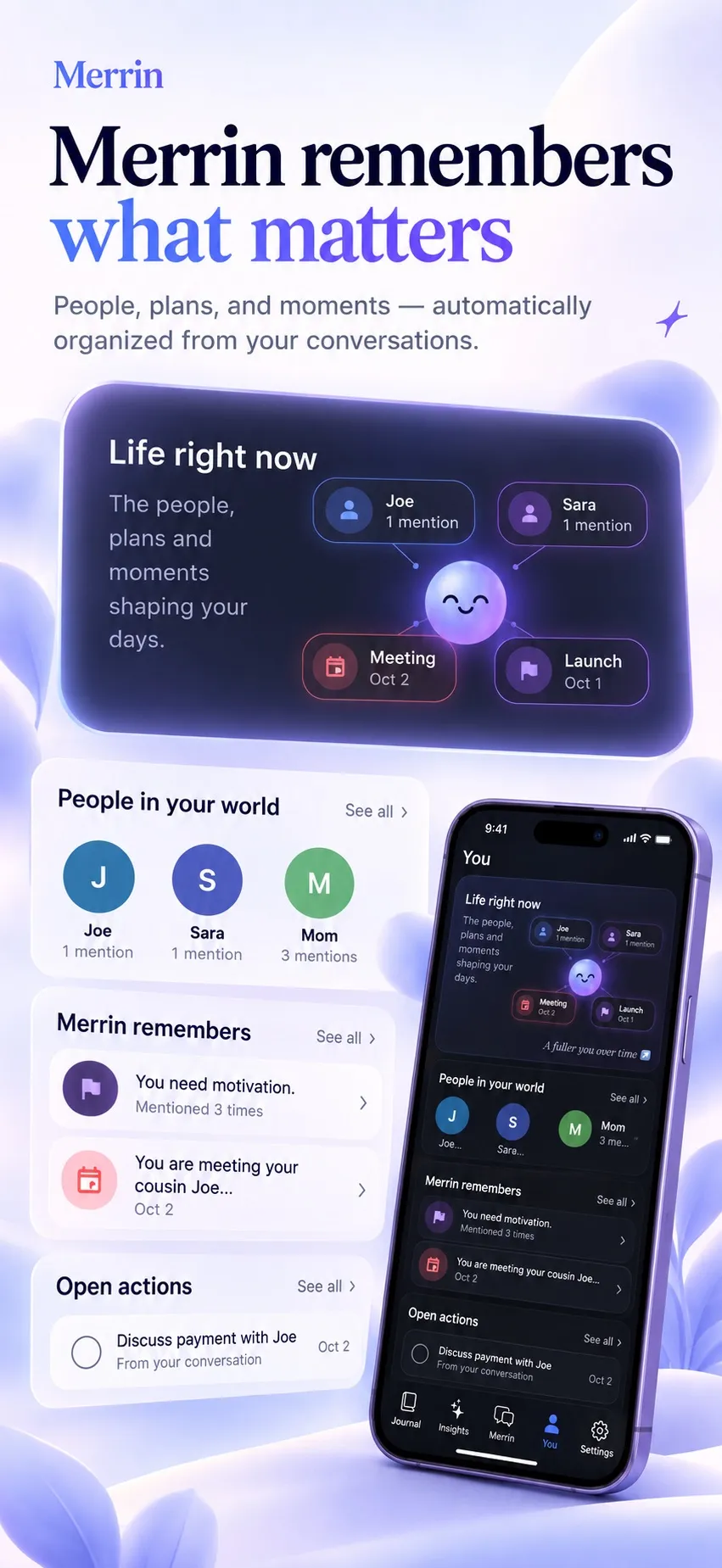
- Its memory is yours to edit. Merrin remembers the people, plans, and decisions you mention. Every memory can be viewed, corrected, or deleted, which we explain in AI memory you can see and delete.
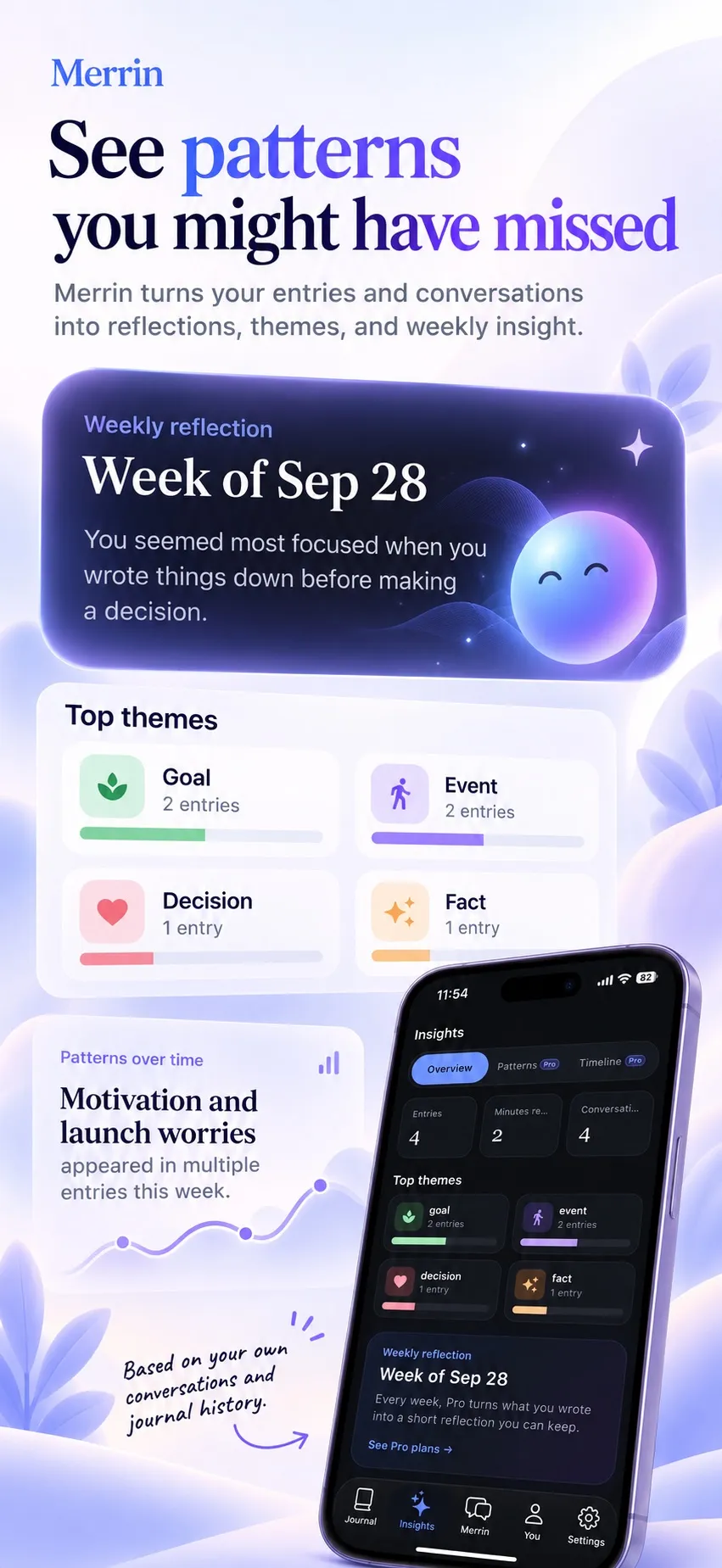
- It connects what you say today with what you said before. Search works by meaning, so “that job I wasn’t sure about” can find the right conversation even if you never used those words. On Pro, insights also show what keeps coming back and when your view on something changed.
Pros
- Conversation, voice, journal, and memory on the device
- No account, and encrypted backup and full deletion on every plan
- A memory you can read and correct, not a hidden profile
Limitations
- The first model download needs internet and several gigabytes of storage
- Phone-sized models know less about the world than large cloud models, and quality varies with your device
- No web search, document questions, or importing your own models
One more limit to know about: if you dictate with your phone keyboard’s built-in microphone instead of Merrin’s own voice mode, that uses the operating system’s speech service, which isn’t guaranteed to stay on the device. The privacy policy lists everything Merrin does send over the internet: model downloads, purchases, configuration checks, and optional diagnostics.
Price and platforms: iOS and Android. The free plan has no message limits and includes text and voice conversations, automatic journal entries, memory, and search by meaning. Pro adds insights into what keeps coming back and how your views change, weekly reflections, the Analyst, Future You, and Devil’s Advocate perspectives, and a larger AI model, for $29.99 a year or $99.99 once.
Talk through what’s on your mind, and let Merrin keep a journal and a memory you can edit, with the AI running on your phone. Get Merrin for iOS and Android →
Merrin vs. the other six
| App | Works offline | Voice | Memory between chats | Questions about documents | Use your own models |
|---|---|---|---|---|---|
| Merrin | Yes, after model download | Voice conversations | Yes, editable | No | No |
| Private Mind | Yes, after model download | Dictation, on the device | Not documented | Yes, PDF and text files | Yes |
| Private AI | Yes, after model download | Not documented | Not documented | Not documented | Yes, with the paid upgrade |
| Jan | Yes, with local models | Not documented | Not documented | File upload | Yes |
| AnythingLLM | Yes, with local models | Dictation and read-aloud | Yes, opt-in and editable | Yes, its main feature | Yes |
| Proton Lumo | No | Dictation on web and mobile | Yes, opt-in and editable | File uploads | No, Proton’s models |
| Duck.ai | No | Voice chat, audio sent to OpenAI | Not documented | Not documented | Choose from its list |
Running the AI locally doesn’t set Merrin apart on its own. Private Mind also runs offline and also transcribes speech on the device, and AnythingLLM’s Android app can keep documents and memory offline too. What’s different is what Merrin does with a conversation afterwards: it turns it into a journal entry, keeps the details that matter in an editable memory, and connects them to things you said weeks ago. If you mostly want answers to questions, a general offline app is a better fit.
The other six, reviewed
2. Private Mind: best for offline questions about your documents
Private Mind is a free, open-source app from Software Mansion, a company known for its work on React Native. It runs open models such as Llama, Gemma, and Qwen on your phone, and version 1.3.5 added Liquid AI’s LFM 3 models, including one that answers questions about your photos. You can import a PDF or text file and ask about it, and each answer links to the passage it came from, so you can check it. Speech-to-text runs on the device through Whisper, and a built-in benchmark shows how fast each model runs on your phone before you commit to it. Its App Store and Google Play listings both declare no data collected, though the Google Play listing also says it may share app activity with third parties, without saying why.
Pros
- Answers about your files, with citations
- On-device dictation
- Free, with no account or subscription
Limitations
- Each model is about 1 to 3 GB; Google Play recommends 4 GB of memory for larger ones, and the developer's site suggests 8 GB to run them all
- Voice is dictation only; its listings don't describe spoken replies
- An optional web search toggle, added in version 1.3 and off by default, sends your search query out and fetches pages when you switch it on
Price and platforms: free. iPhone and iPad with iOS 17 or later, Macs with Apple silicon through the App Store, and Android.
Choose it over Merrin when you want to ask questions about documents offline, or you’d like to pick and compare models yourself.
3. Private AI: best for local models on Android
Private AI, published on Google Play by FireEdge, is a plain offline chat app. It comes with a catalog of built-in models, with Gemma 2 as the default and options including Llama 3.2, Phi-3.5 mini, and Mistral, and you can switch between them. Conversations are searchable, there are no ads, and the listing’s data safety section says no data is collected. With the paid upgrade, you can load any compatible GGUF model file.
Pros
- Simple setup with models ready to pick
- No data collected, according to its Play listing
- Import your own models with the upgrade
Limitations
- Android only
- The built-in models are older releases; newer ones mean importing your own
- The catalog includes models the developer describes as uncensored, with no guardrails
Price and platforms: free on Android. Google Play lists one in-app purchase, at $9.99.
Choose it over Merrin when you’re on Android and want a no-frills offline chat with a range of models to try.
4. Jan: best for desktop AI with model choice
Jan is an open-source desktop app, under the Apache 2.0 license, for running models on your own computer. It works fully offline with local models, can run a local API server so other apps on your computer can use the same model, and supports MCP connectors for tools. Its privacy page says there’s no data collection until you choose to allow anonymous usage counts.
Pros
- Open source, with a wide choice of local models
- A local API for other apps
- Analytics only if you agree
Limitations
- Desktop only, and speed depends on your computer
- Cloud models from OpenAI, Anthropic, and others sit beside local ones; messages to those go to the provider
Price and platforms: free. macOS, Windows, and Linux.
Choose it over Merrin when you work on a computer and want to try many models, or plug a local model into other tools.
5. AnythingLLM: best for document workspaces
AnythingLLM organizes your files into workspaces and lets you ask questions across them. The desktop app includes a built-in local model and a local speech-to-text option, and it can read replies aloud. Its memories feature is off by default. Once you switch it on, it picks up short facts about you from recent chats, and you can view, edit, or delete each one. There’s also a free, open-source Android app that works offline with an on-device model, documents and memory included; an iOS version is planned without a date.
Pros
- Built for asking across many documents
- Memory you can see and edit
- Desktop, self-hosted, and Android versions
Limitations
- More setup than a phone chat app
- If you connect a cloud provider, your prompts and the relevant parts of your documents go to it
- Memory is a short list of facts, not a record of past conversations
- Sends anonymous usage data until you switch it off in settings
Price and platforms: the desktop app is free; AnythingLLM says it will stay free for 99% of features. An optional Pro subscription removes daily limits on some extra AI tools. macOS, Windows, Linux, Docker, and Android.
Choose it over Merrin when your private material is mostly files: contracts, research, meeting notes, a folder of PDFs.
6. Proton Lumo: best for private cloud AI
Lumo is Proton’s AI assistant, from the company behind Proton Mail. It runs on Proton’s servers, and Proton says it keeps no logs of your chats and doesn’t train on them. Saved history is zero-access encrypted, meaning Proton can’t read it. Lumo has memory: switch it on, and Lumo learns your preferences and context, and you can view, edit, or delete what it keeps. Memory needs a Proton Account and works on free and paid plans. You can dictate messages on the web and in the mobile apps.
Pros
- Large models for writing and research
- Encrypted history and memory
- Works on the web, iPhone, and Android
Limitations
- Your messages are processed on Proton's servers, so you're trusting its policy, not your own device
- No offline use
Price and platforms: free tier; Lumo Plus is $9.99 a month billed yearly ($119.88). Web, iOS, and Android.
Choose it over Merrin when you want a capable general-purpose assistant and are comfortable with a cloud service under a no-logs policy.
7. Duck.ai: best for anonymous cloud chat
Duck.ai is DuckDuckGo’s free chat service. It gives you a choice of models from several providers, including OpenAI and Anthropic, and passes your prompts on without your IP address. Recent chats are stored on your device, not on DuckDuckGo’s servers, unless you turn on its optional sync, which stores them encrypted so DuckDuckGo can’t read them. Voice chat streams your audio to OpenAI through an encrypted relay, and DuckDuckGo says neither company keeps the audio after the session.
Pros
- Well-known models, with your IP address removed
- Chat history kept on your device by default
- Voice chat
Limitations
- The anonymity covers who you are, not what you type; providers still receive your prompt
- No offline use
- Daily limits on voice chats, higher for subscribers
Price and platforms: free; DuckDuckGo’s paid Plus and Pro plans add more advanced models and higher limits. Works on the web and in the DuckDuckGo browser on Mac, Windows, iPhone, iPad, and Android.
Choose it over Merrin when you want quick answers from familiar cloud models and the questions aren’t personal.
Our ChatGPT alternatives list goes deeper on the retention and training policies behind Lumo, Duck.ai, Jan, and AnythingLLM.
On-device or private cloud?
With a local app, your words stay on hardware you control, and the risks are the device itself and its backups. With a private cloud service, the server has to read your message to answer it, and you’re relying on the company’s promise about what happens next. Proton and DuckDuckGo have published specific promises, but you can’t check from your side whether they’re kept.
Cloud models are bigger, so they know more and can search the web. Local models are smaller, need storage, and run better on a recent device. Our on-device vs cloud AI comparison goes through the trade-offs one by one.
Which private AI chatbot is right for you?
Choose Merrin for private conversations, voice journaling, and a memory of your own life you can read and edit.
Choose Private Mind for offline questions about documents on your phone, with web search there if you switch it on.
Choose Private AI for a simple offline chat on Android with plenty of models to try.
Choose Jan if you’re on a computer and model choice matters most.
Choose AnythingLLM if your work centers on documents and you want them in organized workspaces.
Choose Proton Lumo or Duck.ai when a private cloud service suits you better than managing models on your own device.
These aren’t exclusive. You might keep a cloud assistant for research and code, and a local app for the things you’d rather not send anywhere. If you want that second one to remember what you’ve talked about, and keep a journal as you go, Merrin is free to download on iOS and Android.
Frequently asked questions
What is the best private AI chat app for iPhone?
It depends on what you want it for. For personal conversations, journaling, and a memory you control, Merrin runs the AI on the phone. For offline questions about documents, Private Mind is free, open source, and runs on iPhone and iPad with iOS 17 or later. If you'd rather use a large cloud model under a no-logs policy, Proton Lumo has an iPhone app. Private AI, also on this list, is Android only.
Which AI chat apps work completely offline?
The ones that run the AI on your device. On phones, that's Merrin, Private Mind, and Private AI; on computers, Jan and AnythingLLM with a local model. Each needs internet once to download a model, and optional extras such as web search still use the network. Proton Lumo and Duck.ai need a connection for every message. To check any app yourself, switch on airplane mode and send a message.
Can an AI assistant remember conversations without cloud storage?
Yes. Merrin keeps its memory on your phone, and you can view, edit, or delete each thing it remembers. AnythingLLM's memories feature works with local models, including offline in its Android app. Proton Lumo also has memory, tied to your Proton Account and zero-access encrypted. Private Mind, Private AI, and Jan keep a searchable chat history, but their documentation doesn't describe memory that carries from one chat to the next.
What is the difference between private cloud AI and on-device AI?
With on-device AI, the model runs on your phone or computer, so your words don't need to go anywhere and it works offline. With private cloud AI, your message is sent to the company's server to be answered, and you rely on its promise not to log, keep, or train on it. Cloud models are larger and know more. On-device models are smaller and depend on your hardware.
Are offline AI chat apps free?
Mostly. Private Mind and Jan are free and open source. Private AI is free, with a paid upgrade for importing your own models. AnythingLLM's desktop app is free, with an optional Pro subscription for extra features. Merrin's free plan has no message limits and includes voice, the journal, and memory; Pro costs $29.99 a year or $99.99 once. The two cloud services, Lumo and Duck.ai, have free tiers and paid plans.
Can private AI apps support voice conversations?
Some can. Merrin is built around voice, with speech recognition designed to run on the phone. Private Mind turns speech into text on the device for dictation, and AnythingLLM has a built-in local speech-to-text option and can read replies aloud. Duck.ai has full voice chat, but your audio streams to OpenAI through DuckDuckGo's relay. Lumo takes dictation on the web and in its mobile apps.
Which private AI app is best for personal journaling?
Of these seven, Merrin is the only one built for it. On the free plan, conversations become journal entries automatically; Pro shows what keeps coming back and how your views change over time. The others can hold a private conversation but don't keep a journal. For dedicated journaling apps, including ones without AI, see our comparison of private AI journaling apps.