
Most people don’t stop using ChatGPT because it’s bad. They stop because of what they want to say to it: a health worry, a contract from work, a decision about a relationship. The answer would be useful. Sending it to a server feels like a lot.
There are good alternatives, and they split into two groups. Some run the AI on your own phone or computer, so your words don’t need to leave it. Others still use servers, but promise not to log your chats, keep them, or train on them. That’s privacy by design versus privacy by policy. Both can be the right call. You just need to know which one you’re getting.
This list is published by the team that builds Merrin, and Merrin is first on it. We’ve tried to keep the other apps’ strengths visible, and we’re clear about what Merrin doesn’t do. Every claim about another app comes from its own documentation, last checked on October 30, 2026.
We re-checked all nine other apps against their own pages.
- PocketPal AI added web search through You.com in late October. It works without an API key of your own, so your searches can now reach You.com without one.
- LM Studio: we’ve added its optional cloud-hosted models, and LM Link, in preview, for using your models from another device. Chats with a local model still stay on your computer.
- Duck.ai: we now name the providers its privacy terms list (OpenAI, Anthropic, Azure OpenAI, and together.ai) and its paid Plus and Pro plans.
- Jan: it asks about analytics the first time you open it, and we’ve corrected its list of cloud providers.
- AnythingLLM: we say more plainly that it sends anonymous usage data until you switch it off.
- GPT4All and Open WebUI: GPT4All hasn’t had a release since February 2025, and we describe Open WebUI’s licence terms more precisely.
- Merrin: recurring themes are marked as part of Pro, and we note that Merrin’s own dictation stays on the device by default.
No changes for Proton Lumo or Brave Leo.
The 10 alternatives at a glance
| # | App | Best for | Where the AI runs | Platforms |
|---|---|---|---|---|
| 1 | Merrin | Private personal conversations and journaling | On your phone | iOS, Android |
| 2 | Proton Lumo | A private general-purpose assistant | Proton’s servers, no chat logs | Web, iOS, Android |
| 3 | Duck.ai | Anonymous access to well-known models | Third-party providers, IP stripped | Web, DuckDuckGo apps |
| 4 | Brave Leo | AI help while you browse | Mostly Brave-hosted servers | Brave browser |
| 5 | LM Studio | Running local models on a computer | Your computer, cloud optional | macOS, Windows, Linux |
| 6 | Jan | An open-source desktop chat app | Your computer, cloud optional | macOS, Windows, Linux |
| 7 | AnythingLLM | Chatting with your own documents | Your computer, cloud optional | macOS, Windows, Linux |
| 8 | Open WebUI | Self-hosting for yourself or a team | Wherever you host it | Self-hosted web app |
| 9 | GPT4All | Simple offline AI on a laptop | Your computer | macOS, Windows, Linux |
| 10 | PocketPal AI | Trying local models on a phone | On your phone | iOS, Android |
These apps don’t all do the same job. Lumo, Duck.ai, and Leo are the closest to ChatGPT itself. The desktop tools give you ChatGPT’s interface with a model you run yourself. Merrin is built for a narrower thing, conversations about your own life, and each entry below is judged on what it’s for.
What “private” means for an AI chat
To answer you, a model has to read what you wrote. So the first question is where that reading happens. If it’s on your device, nothing needs to travel. If it’s on a server, encryption protects your words on the way there and in storage, but the server still sees them while it works. We explain this in more depth in our private intelligence explainer.
After that, ask four things of any service: does it keep a log of your chats, how long does it hold them, does it train on them, and who else (model providers, reviewers) gets a copy. And for local apps, one more: does it quietly offer a cloud model? Most of the desktop tools below do, and once you pick one, that provider’s rules apply.
The 10 alternatives, reviewed
1. Merrin: best for private personal conversations
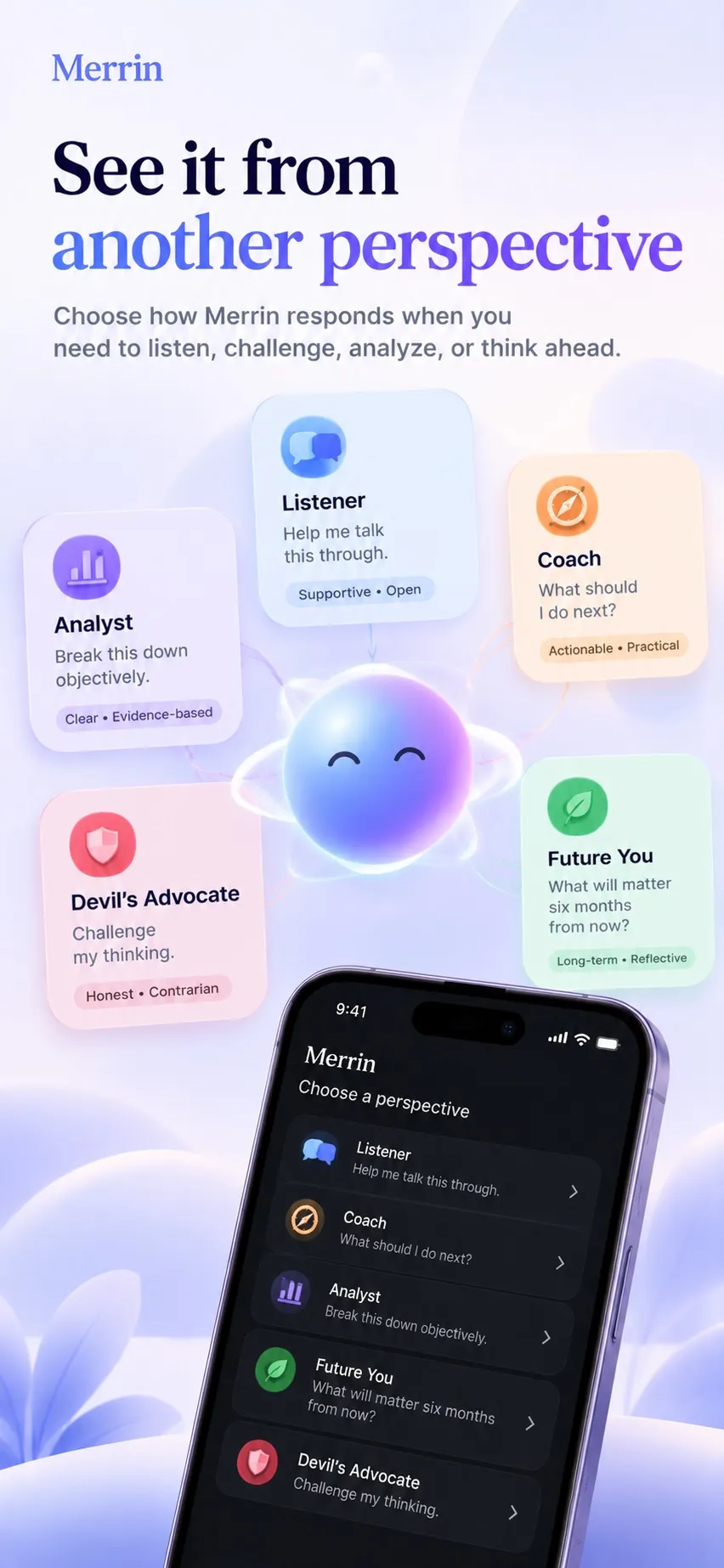
Merrin is for the conversations you’d have with a notebook. You talk or type about what’s on your mind, and it asks follow-up questions. Over time it keeps a journal of those conversations, remembers the people, plans, and decisions you mention, and, with Pro, points out themes that keep coming back. You can find things by meaning, so “that job I was unsure about” can turn up the right conversation even if you never used those words. Our page on conversational journaling shows how the journal works, step by step.
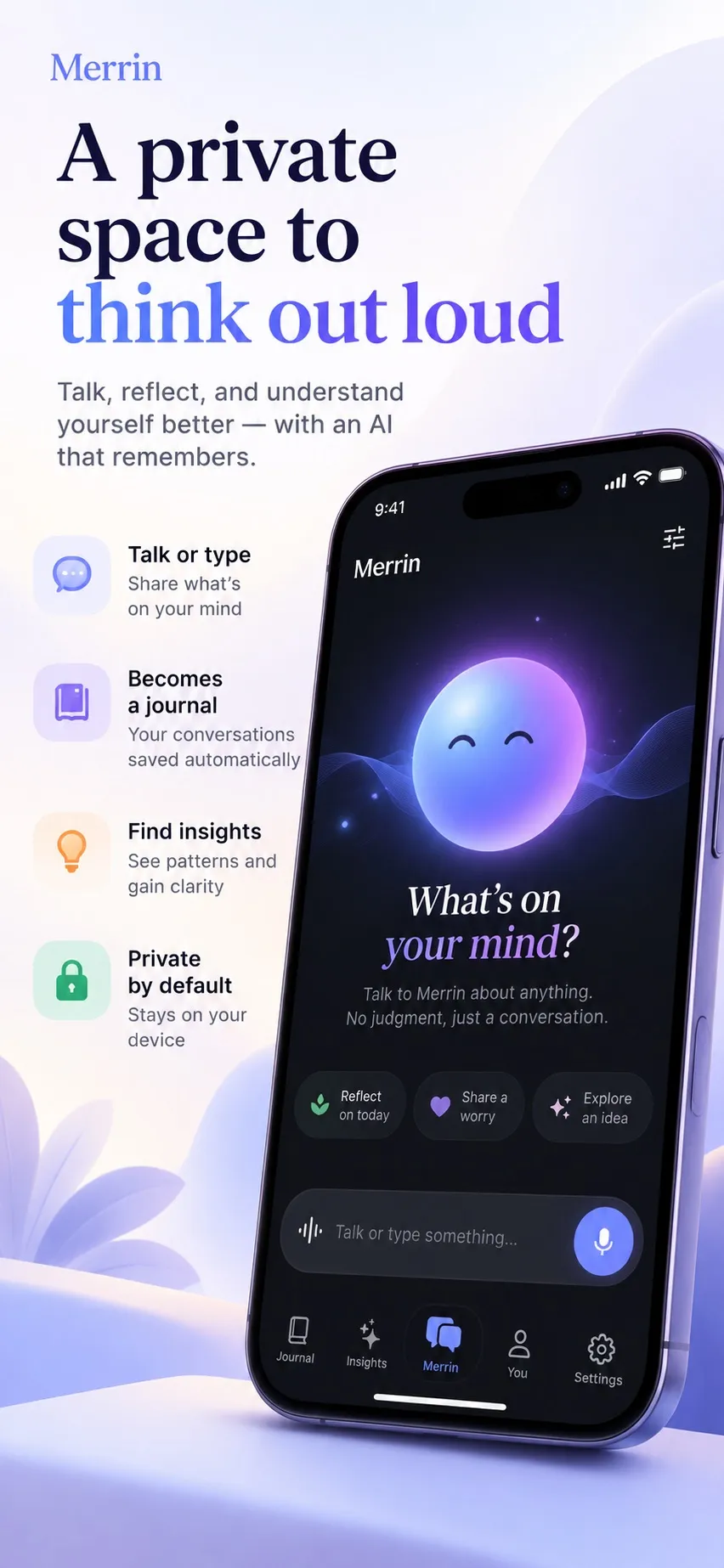
The AI runs on the phone. Conversations, voice transcripts, journal entries, and memories are designed to stay on your device during normal use, and there’s no account to create. Core features work offline once the models are installed. Every memory can be viewed, edited, or deleted, which we wrote about in AI memory you can see and delete. The privacy policy lists what does use the internet: model downloads, purchases, configuration checks, and optional diagnostics.
The catch: it doesn’t search the web, and it isn’t built for coding or research. The first setup downloads AI models that take several gigabytes of storage. A phone-sized model knows less about the world than a large cloud model. Merrin’s own Speak button keeps speech recognition on the device by default, but if you dictate with your phone’s keyboard instead, that uses the operating system’s speech service, which isn’t guaranteed to stay on the device.
Free, with no message limits, and the free plan includes voice, the journal, and memory. Pro adds insights into what keeps coming back and how your views change, weekly reflections, more perspectives, and a larger AI model.
2. Proton Lumo: best for a private general-purpose assistant
Lumo is the closest match here to ChatGPT as an everyday assistant. It’s from Proton, the company behind Proton Mail, and it runs on servers Proton controls, using open-source models. Proton says it keeps no logs of your questions or answers and doesn’t train on your chats. If you save your history, it’s zero-access encrypted, meaning Proton can’t read it. Chats in guest mode are erased when the session ends.
The catch: it’s a cloud service. Your prompt is decrypted on Proton’s servers so the model can answer, which means you’re trusting Proton’s no-logs policy, not your own hardware. It doesn’t work offline.
There’s a free tier. Lumo Plus is $9.99 a month on the annual plan.
3. Duck.ai: best for anonymous access to well-known models
Duck.ai is DuckDuckGo’s chat service. It lets you use models such as GPT, Claude, and Mistral, and it removes your IP address and other identifying details before passing your prompt to the providers that run them; its privacy terms name OpenAI, Anthropic, Azure OpenAI, and together.ai. DuckDuckGo says its agreements stop the providers from training on your prompts, and recent chats are stored on your device, not on DuckDuckGo’s servers.
The catch: the anonymity covers who you are, not what you type. If your prompt contains your name or your employer, the provider receives it. Providers must delete prompts within 30 days at most, with limited exceptions for safety and legal compliance; some models are marked zero data retention and zero provider visibility. Voice chats stream audio to the provider as you speak.
Free models are available. The paid Plus and Pro plans add more advanced models.
4. Brave Leo: best for AI help while you browse
Leo is built into the Brave browser on desktop, Android, and iOS. It can summarize the page you’re on, answer questions about it, or just chat. Brave says Leo doesn’t keep or share your chats or use them to train models, and that it doesn’t collect your IP address.
On desktop, Leo has an option most browser assistants don’t: you can point it at a model running on your own computer through Ollama, and those requests never reach Brave.
The catch: with Brave’s hosted models, your prompt and the page you’re asking about are sent to Brave’s servers to be processed. That’s a reasonable trade for summarizing a news article, and a bigger one for a page holding your medical results.
Free, with a Premium tier for higher limits and more models.
5. LM Studio: best for running local models on a computer
LM Studio is a desktop app for downloading open models and chatting with them on your own machine. Once a model is downloaded, it works completely offline, including chatting with documents you attach. It can also run a local server, so other apps on your computer can use the same model. It’s free for home and work use.
The catch: how good it feels depends on your computer. A recent laptop with plenty of memory runs mid-sized models well; an older one will be slow or limited to small models. Searching for and downloading models needs the internet, and so do update checks. LM Studio has also added optional online features: LM Link, in preview, lets you use your models from another device, and some open models can now run on US-hosted cloud servers, from inside LM Studio, instead of on your machine. Chats with a local model stay on your computer; anything you send to a cloud-hosted model doesn’t.
6. Jan: best open-source desktop chat app
Jan does a similar job to LM Studio and is fully open source, under the Apache 2.0 licence. It runs local models offline, and your chat history is stored as plain JSON files in a folder on your computer. It asks about analytics the first time you open it and collects nothing unless you agree.
The catch: Jan also lets you connect cloud models from OpenAI, Anthropic, Mistral, and others, right next to your local ones. That’s convenient, and it’s also easy to forget which one you’re talking to. Messages sent to a cloud model go to that provider.
Free.
7. AnythingLLM: best for chatting with your own documents
AnythingLLM is the strongest pick here if your private material is mostly files: contracts, research papers, meeting notes, a folder of PDFs. You put documents into workspaces and ask questions across them. The desktop app includes a built-in local model and can store everything on your computer, and its documentation says your chats and documents are saved locally by default.
The catch: like Jan, it can connect to cloud providers, and if you choose one, your prompts and the relevant parts of your documents go to it. It also sends anonymous usage data until you switch it off in settings: which model you use and when you add a document or send a chat, not what they say. Check both before you load anything sensitive.
8. Open WebUI: best for self-hosting
Open WebUI gives you a ChatGPT-style web interface that you run yourself, usually alongside Ollama for the models. It can run entirely offline, and because you host it, your chats live on your machine or server. It works well for a household or a small team that wants a shared private assistant.
The catch: it takes real setup, usually Docker or a Python install, and you’re responsible for keeping it updated and secure. Hosting the interface yourself doesn’t make everything local, either. If you connect it to a cloud API for the model, or for document processing, your data goes there. It’s free, but the licence isn’t standard open source: since version 0.6.6 in April 2025, a deployment with more than 50 users in a 30-day period has to keep Open WebUI’s branding unless it has an enterprise licence.
9. GPT4All: best for simple offline AI on a laptop
GPT4All, from Nomic, is one of the easiest ways to try local AI. You install it, pick a model, and chat, and Nomic says no data leaves your machine. Its LocalDocs feature lets you ask questions about files on your computer without uploading them. Sharing your chats with Nomic’s open data lake is opt-in and off by default. It’s free and MIT-licensed.
The catch: bigger models are slow on an ordinary laptop, so you’ll often trade quality for speed. Development has also slowed: the latest release, version 3.10.0, came out in February 2025.
10. PocketPal AI: best for trying local models on a phone
PocketPal AI is an open-source app for iPhone, iPad, and Android that runs language models on the phone. You browse and download models from Hugging Face inside the app, adjust settings, and chat offline. Its App Store listing says no data is collected.
The catch: you choose and manage the models yourself, which means knowing roughly what your phone can handle and keeping an eye on storage. It’s a general chat app, not a journal: it doesn’t build memory or reflections from your conversations. Optional features send data off the device: connecting a remote server, and web search, which can now run through You.com without an API key of your own. The app is free, with optional in-app purchases. Our PocketPal AI vs Merrin comparison goes into the differences in detail.
Talk through what’s on your mind, and let Merrin remember what matters, with the AI running on your phone. See how Merrin handles privacy →
Local AI or private cloud AI?
The real choice is between two kinds of trust. With a local app, you trust your own device: if it’s locked, backed up the way you want, and not compromised, your conversations go nowhere. With a private cloud service, you trust a company’s policy and its engineering. Proton, DuckDuckGo, and Brave have each published specific, checkable promises, and that counts for a lot, but you can’t verify from your side what happens on the server.
In return, cloud models are bigger. They know more, reason better on long problems, and can search the web. A local model on a phone or laptop is good at conversation and summarizing, and weaker on general knowledge. It also needs storage, and a recent device to run well.
One test settles which kind you have: switch on airplane mode and send a message. If the AI still answers, it’s running on your device. We go through the rest of the trade-offs in our on-device vs cloud AI comparison.
Which one should you choose?
For personal reflection on your phone, Merrin. It keeps the AI on the device and turns conversations into a journal and memory you control. PocketPal AI is the option if you’d rather pick and tune models yourself.
For a private everyday assistant that can handle the questions you’d ask ChatGPT, Proton Lumo. Duck.ai is a good choice if you mostly want anonymous access to familiar models, and Brave Leo if you already use Brave.
For work documents, AnythingLLM with a local model, or GPT4All’s LocalDocs if you want something simpler. Keep cloud providers switched off for anything confidential.
For technical users, LM Studio or Jan on a single computer, and Open WebUI with Ollama if you want to host a private assistant for more than one person.
Nothing stops you from using more than one. Plenty of people keep a cloud assistant for research and code, and something local for the conversations they’d rather keep to themselves. If that second kind is what you’re after, Merrin is free to download on iOS and Android.
Frequently asked questions
What is the most private alternative to ChatGPT?
An app that runs the AI model on your own device, because your conversations don't need to reach a server at all. On a phone, Merrin and PocketPal AI do this. On a computer, LM Studio, Jan, GPT4All, and AnythingLLM can run fully offline with local models. If you need a cloud model, Proton Lumo keeps no chat logs and encrypts saved history so that Proton can't read it.
Are private AI chats really private?
It depends on where the AI runs. With a local app, your words are processed on your device and the main risks are the device itself and its backups. With a private cloud service, the provider's server has to read your prompt to answer it, and you're trusting its promise not to log or keep it. Both can be reasonable. They aren't the same.
Can a ChatGPT alternative work offline?
Yes, if the AI runs on your device. You need a connection once to download the model. After that, apps like Merrin, PocketPal AI, LM Studio, Jan, and GPT4All can respond with no internet at all. Cloud services such as Lumo, Duck.ai, and Brave Leo's hosted models need a connection for every message.
Can AI providers read my conversations?
A cloud AI has to read your prompt on its servers to generate a reply. Whether it keeps, reviews, or trains on that prompt depends on its policy. Proton says Lumo keeps no logs, Duck.ai says its providers delete prompts within 30 days with limited exceptions, and Brave says Leo doesn't retain chats. With a local model there's no provider in the loop.
What happens to my deleted chats?
In a local app, deleting a chat removes it from your device, though a device backup you set up may still hold a copy. With a cloud service, deletion follows the provider's retention policy, which can include a delay or exceptions for safety and legal reasons. Read the retention section of the privacy policy before you share anything you'd want gone for good.
Is Merrin a full replacement for ChatGPT?
No. Merrin is built for personal conversations: thinking out loud, journaling, and seeing your own patterns over time, with the AI running on your phone. It doesn't search the web, and it isn't built for coding or deep research. Many people use a cloud assistant for those and keep personal conversations somewhere private.